ES
 RU
 DE
 PL
 IT
 TR
 FR
 BR
 NL
 CN
 CZ
 UA
 HU
 SE
 Sale
Smart Find AI - Live Product Search for WooCommerce
 Sales:
Choose a license
Popular Services from WordPress Plugins Experts
 Get in Subscription
MonsterONE - Unlimited Downloads for $14.08/mo
 License permits using this item to create unlimited digital end products for sale during the active period of your subscription.
|
Support
Join to Download this Item


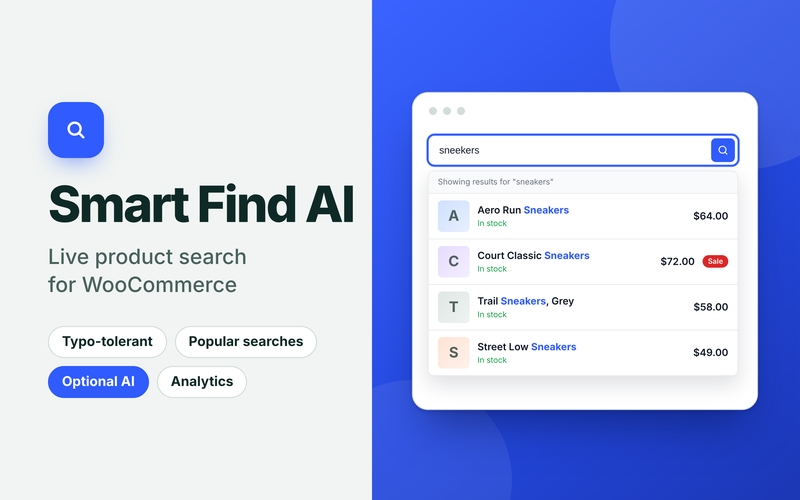
Help shoppers find the right product in seconds. Smart Find AI adds a fast live search box to your WooCommerce store. The search index builds automatically in the background.
Key Features
- Instant, typo-tolerant live search: searches names, SKUs, categories, tags, and attributes, with thumbnails, prices, and stock status.
- Optional AI search in plain language: understands searches like “red running shoes under $80”. It is off by default, with your own OpenAI, Anthropic, or Gemini key, and falls back to normal search.
- Search analytics and merchandising controls: top searches, searches with no results, clicks, orders and revenue, plus synonyms, pinned products, ranking weights and hide or boost rules.
What shoppers get
- Instant results with thumbnail, price, sale badge, and stock status
- Typo tolerance, so “sneekers” still finds sneakers
- Popular products shown when they click the empty search box
- Search by name, SKU, category, tag, attribute, or description
- Keyboard navigation and screen reader-friendly markup
What you control
- Synonyms, pinned products, ranking weights, and hide or boost rules
- Reports on top searches, searches with no results, clicks, orders, and revenue
- Light, dark, or automatic colours, your accent colour and custom CSS
- Designed to work with WPML and Polylang
Optional AI search
Turn on AI with your own OpenAI, Anthropic, or Google Gemini key, and shoppers can search in plain language, such as “red running shoes under $80”. It is off by default. Only the search text and your category names are sent, and if anything fails, normal search takes over.
Requires WordPress 6.0+, WooCommerce 7.0+, and PHP 7.4+. Full documentation is included.
Try it first. Search the demo store, then log in to the admin panel and change settings yourself.
Important Note
All the images included in this plugin are for preview purposes only. They are not part of the plugin and are NOT included in the final purchase files.
0 Reviews for this product
0 Comments for this product
Customer Support
This rating is based on feedback from customers who have received support from the author of this product.
This value represents the average response time to a client's inquiry or request.